

#Short Answer
A domain name is part of the Domain Name System (DNS), which translates human-friendly names into machine-readable IP addresses. For example, the domain name example.com corresponds to an IP address such as 93.184.216.34. This system allows users to access websites without needing to remember complex numerical sequences.
#Infobox
#Overview
A domain name is part of the Domain Name System (DNS), which translates human-friendly names into machine-readable IP addresses. For example, the domain name example.com corresponds to an IP address such as 93.184.216.34. This system allows users to access websites without needing to remember complex numerical sequences.
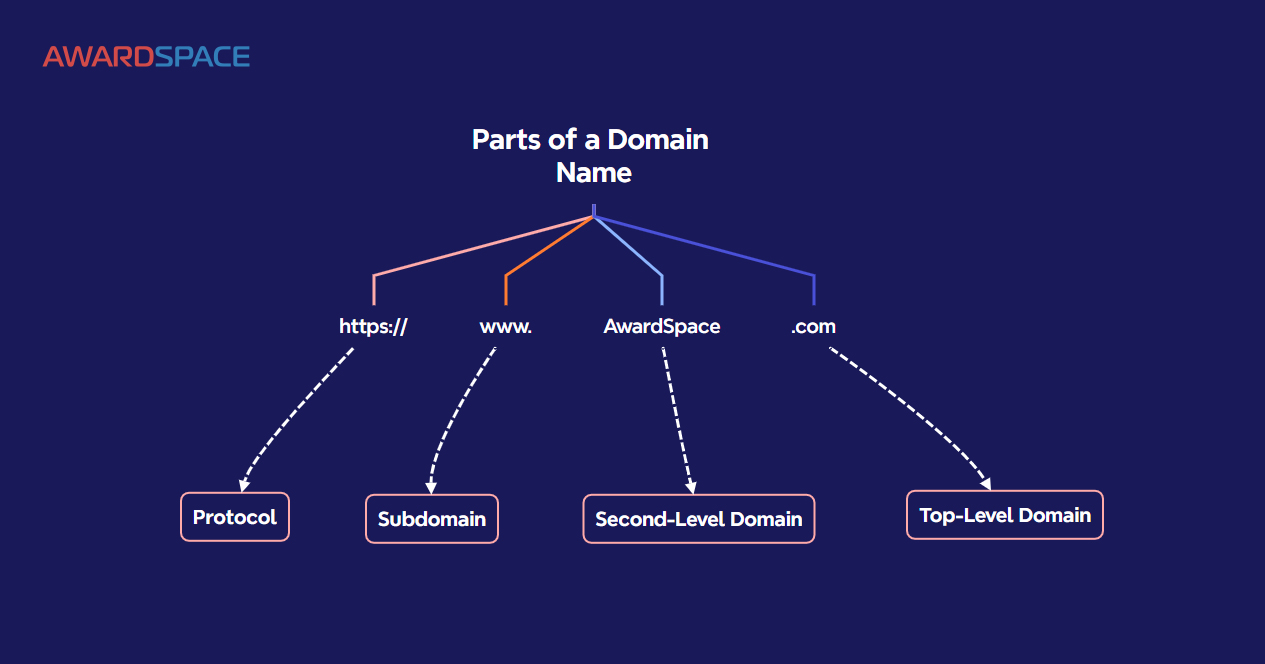
Domain names are structured hierarchically, consisting of multiple parts separated by dots. The rightmost part, known as the top-level domain (TLD), indicates the type of organization or country code (e.g., .com, .org, .net, or .uk). The second-level domain is the part directly to the left of the TLD (e.g., example in example.com), and subdomains can further refine the address (e.g., blog.example.com).
#Purpose and Function
Domain names serve several key functions:
- Identification: They provide a unique, memorable name for a website or online service.
- Navigation: Users can easily locate and access websites without memorizing IP addresses.
- Branding: Businesses and organizations use domain names to establish their online identity and credibility.
- Email Hosting: Domain names are often used for professional email addresses (e.g.,
contact@example.com).
#History / Background
The concept of domain names emerged in the early days of the Internet to address the growing need for a more user-friendly naming system. Before domain names, computers on the Internet were identified solely by their IP addresses, which were difficult to remember and prone to errors.
#Early Development
The first domain name, symbolics.com, was registered on March 15, 1985, by Symbolics Inc., a computer systems company. This marked the beginning of the modern domain name system. Prior to this, a simple text file called HOSTS.TXT was used to map hostnames to IP addresses, but it became impractical as the Internet grew.
In 1983, Paul Mockapetris invented the Domain Name System (DNS) to decentralize and automate the process of name resolution. This system introduced hierarchical domain names and distributed databases, allowing for scalability and efficiency.
#ICANN and Modern Management
In 1998, the Internet Corporation for Assigned Names and Numbers (ICANN) was established to oversee the global coordination of domain names and IP addresses. ICANN manages the root zone of the DNS and accredits domain name registrars, which are responsible for selling and managing domain registrations.
The introduction of new generic top-level domains (gTLDs) in the 2010s, such as .app, .blog, and .tech, expanded the possibilities for domain names, allowing businesses and individuals to choose more specific and relevant extensions.
#How It Works
A domain name operates through a series of steps that involve DNS servers, registrars, and registries. Here’s a simplified breakdown of the process:
#Domain Registration
To obtain a domain name, a user must register it through a domain name registrar, such as GoDaddy, Namecheap, or Google Domains. The registrar checks the availability of the desired domain name and, if available, registers it for a specified period (typically one to ten years). The registration details are then submitted to the appropriate registry, which manages the TLD.
#DNS Resolution
When a user enters a domain name into a web browser, the following steps occur:
- Local Cache Check: The browser first checks its local cache to see if the domain name’s IP address is already stored.
- Recursive DNS Resolver: If not found, the browser queries a recursive DNS resolver, often provided by the user’s Internet Service Provider (ISP).
- Root Name Servers: The resolver contacts one of the root name servers, which directs it to the appropriate TLD name server based on the domain’s extension (e.g.,
.com). - TLD Name Servers: The TLD name server provides the address of the authoritative name server responsible for the domain.
- Authoritative Name Server: The authoritative name server returns the IP address associated with the domain name.
- Web Server Connection: The browser connects to the web server using the IP address and retrieves the requested webpage.
#DNS Records
Domain names rely on various DNS records to function correctly. Some of the most important records include:
- A Record: Maps a domain name to an IPv4 address.
- AAAA Record: Maps a domain name to an IPv6 address.
- CNAME Record: Alias for another domain name, often used for subdomains.
- MX Record: Specifies the mail servers responsible for receiving emails for the domain.
- TXT Record: Stores text data, often used for verification (e.g., SPF, DKIM).
- NS Record: Indicates the authoritative name servers for the domain.
#Important Facts
- Case Insensitivity: Domain names are not case-sensitive.
Example.comis the same asEXAMPLE.COM. - Length Limits: A domain name can be up to 253 characters long, including the TLD. Each label (segment between dots) can be up to 63 characters.
- Allowed Characters: Domain names can include letters, numbers, and hyphens, but cannot start or end with a hyphen. Internationalized domain names (IDNs) allow the use of non-ASCII characters.
- Ownership: Once registered, a domain name is not owned outright but is leased for a specific period. Failure to renew the registration can result in the domain becoming available for others to register.
- Privacy Protection: Many registrars offer WHOIS privacy protection to hide the registrant’s personal information from public view.
- Cybersquatting: The practice of registering domain names with the intent to profit from the goodwill of a trademark belonging to someone else is illegal under laws such as the Anticybersquatting Consumer Protection Act (ACPA).
#Timeline
- Early Internet uses IP
Early Internet uses IP addresses for host identification.
- Paul Mockapetris invents the
Paul Mockapetris invents the Domain Name System (DNS).
- `symbolics.com` becomes the fi
`symbolics.com` becomes the first registered domain name.
- Commercial use of the
Commercial use of the Internet expands, leading to the creation of `.com`, `.org`, and `.net` TLDs.
- ICANN is established to
ICANN is established to manage domain names and IP addresses.
- Introduction of new gTLDs
Introduction of new gTLDs such as `.info` and `.biz`.
- ICANN introduces hundreds of
ICANN introduces hundreds of new gTLDs, including `.app`, `.blog`, and `.tech`.
- Growth of blockchain-based dom
Growth of blockchain-based domain names (e.g., `.eth`, `.crypto`) and increased focus on domain security and privacy.
#Related Terms
#FAQ
What does What Is A Domain Name? cover?
Explains what a domain name is, how it works, common examples, and why the concept matters for readers.
Why is What Is A Domain Name? important?
It helps readers understand key concepts, compare practical use cases, and evaluate how Development decisions affect outcomes, risks, and implementation choices.
What should readers verify before applying this topic?
Readers should compare the benefits, limitations, data requirements, and related themes such as Explainer, Domain, Name before using the ideas in real projects.
#References
- What Is A Domain Name? terminology and background research
- What Is A Domain Name? use cases, implementation examples, and limitations
- Development best practices, standards, and risk guidance
- Explainer case studies, benchmarks, and current industry analysis


Comments
No comments yet. Start the discussion with a useful note.