


#Short Answer
Explains how to build a chatbot from scratch, including the main process, tools, examples, risks, and practical implementation steps.
#Infobox
#Overview
Building a chatbot from scratch is a structured process that combines software development, artificial intelligence, and user experience design. Chatbots are increasingly integral to digital communication, enabling businesses to automate interactions, provide instant responses, and enhance customer engagement. From simple rule-based systems to advanced AI-driven assistants, chatbots can be customized for diverse applications, including customer support, lead generation, and internal workflow automation. The development process typically begins with defining the chatbot’s purpose and target audience. This is followed by selecting a suitable development framework, designing conversation flows, training the AI model using relevant datasets, and rigorously testing the system before deployment. Post-deployment, continuous monitoring and iterative improvements ensure the chatbot remains effective and aligned with user needs.
#History / Background
The concept of chatbots dates back to the mid-20th century, with early experiments in artificial intelligence aiming to simulate human conversation. One of the first notable examples was ELIZA, developed by Joseph Weizenbaum at MIT in 1966. ELIZA used pattern matching and substitution methodology to mimic a Rogerian psychotherapist, demonstrating the potential of natural language processing (NLP) in human-computer interaction. In the 1970s and 1980s, advancements in AI led to more sophisticated systems like PARRY, created by Kenneth Colby, which simulated a person with paranoid schizophrenia. These early chatbots laid the groundwork for modern conversational agents by highlighting the challenges of understanding context and generating coherent responses. The 1990s and early 2000s saw the rise of commercial chatbots, particularly in customer service. Systems like A.L.I.C.E. (Artificial Linguistic Internet Computer Entity), developed by Richard Wallace, used heuristic pattern matching to engage in conversations. However, these systems were limited by their reliance on predefined scripts and lacked true understanding of language nuances. The advent of machine learning and deep learning in the 2010s revolutionized chatbot development. Frameworks such as TensorFlow and PyTorch enabled developers to build AI models capable of learning from large datasets, leading to more natural and context-aware conversations. The introduction of platforms like Dialogflow (by Google) and Microsoft Bot Framework democratized chatbot development, allowing non-experts to create functional bots without extensive coding knowledge. Today, chatbots powered by large language models (LLMs) like GPT-3 and GPT-4 represent the cutting edge of AI-driven conversation. These models leverage vast amounts of training data to generate human-like responses, enabling chatbots to handle complex queries and adapt to various conversational contexts.
#How It Works
#Core Components A chatbot operates through a combination of several key components:
- Natural Language Processing (NLP): NLP enables the chatbot to understand and interpret human language. It involves two primary tasks:
- Natural Language Understanding (NLU): Parses user input to extract intent and entities (e.g., identifying that the user wants to "book a flight" and extracting the destination "New York").
- Natural Language Generation (NLG): Generates human-like responses based on the chatbot’s understanding of the input.
- Dialogue Management: This component manages the flow of conversation, determining the chatbot’s responses based on user inputs and the current state of the dialogue. It can be rule-based (using predefined scripts) or AI-driven (using machine learning models to predict the best response).
- Knowledge Base: A repository of information that the chatbot references to answer user queries. This can include FAQs, product details, or company policies. Advanced chatbots may integrate with external APIs or databases to fetch real-time data.
- Integration Layer: Chatbots often need to connect with other systems, such as CRM software, payment gateways, or third-party APIs, to perform tasks like processing orders or retrieving user data.
- User Interface (UI): The interface through which users interact with the chatbot. This can be a website chat widget, a mobile app, or a messaging platform like Facebook Messenger or WhatsApp.
#Development Process
- Define the Purpose: Identify the chatbot’s primary function, such as customer support, lead qualification, or internal knowledge retrieval. This step involves defining the target audience, use cases, and success metrics.
- Choose a Development Approach:
- Rule-Based Chatbots: Use predefined rules and decision trees to respond to user inputs. Suitable for simple, predictable interactions.
- AI-Powered Chatbots: Utilize machine learning models to understand and generate responses. Ideal for handling complex, context-dependent queries.
- Hybrid Approach: Combines rule-based systems with AI to balance control and flexibility.
- Select a Development Framework: Popular frameworks include:
- Dialogflow (Google): A no-code platform for building conversational AI agents.
- Rasa: An open-source framework for building contextual AI assistants.
- Microsoft Bot Framework: A comprehensive toolkit for developing chatbots across multiple channels.
- TensorFlow/PyTorch: For custom AI model development.
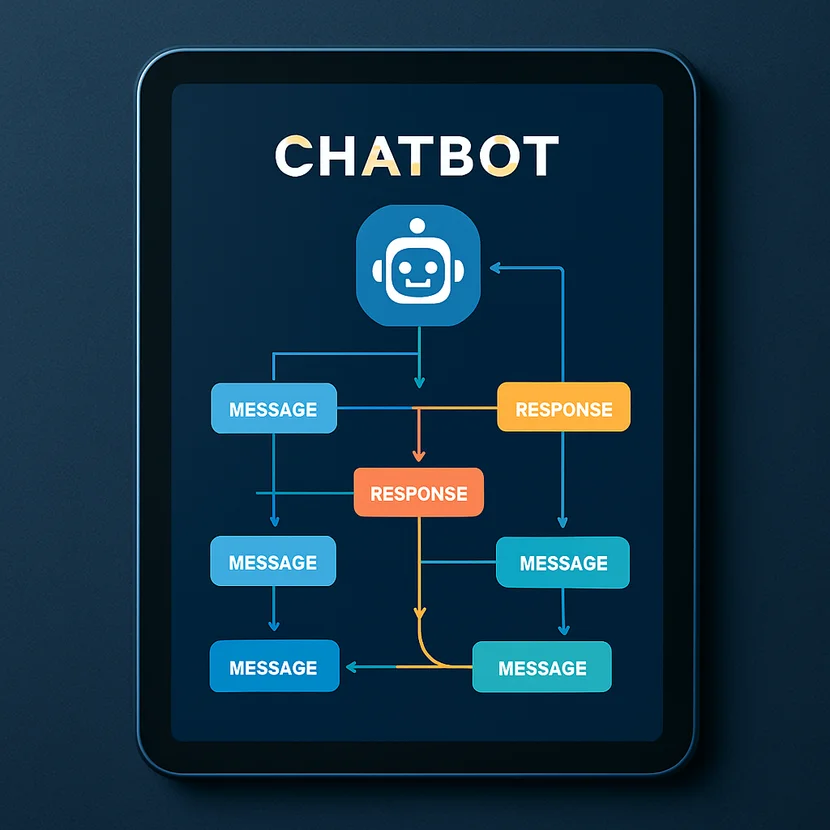
- Design Conversation Flows: Map out potential user interactions and the chatbot’s responses. Tools like Lucidchart or Draw.io can help visualize dialogue paths.
- Train the AI Model: For AI-powered chatbots, training involves feeding the model with labeled datasets to improve its understanding of intents and entities. Techniques like transfer learning (using pre-trained models) can accelerate this process.
- Develop and Integrate: Write the code to implement the chatbot’s logic, integrate it with backend systems, and design the user interface. APIs may be used to connect the chatbot with external services.
- Test and Debug: Conduct thorough testing to ensure the chatbot handles various inputs correctly. This includes unit testing, integration testing, and user acceptance testing (UAT).
- Deploy and Monitor: Deploy the chatbot on the chosen platform (e.g., a website, mobile app, or messaging service). Post-deployment, monitor performance using analytics tools to identify areas for improvement.
#Important Facts
- Efficiency: Chatbots can handle multiple conversations simultaneously, reducing response times and operational costs for businesses.
- Scalability: Unlike human agents, chatbots can scale to handle thousands of interactions without additional resources.
- 24/7 Availability: Chatbots provide round-the-clock support, improving customer satisfaction and engagement.
- Language Support: Modern chatbots can support multiple languages, making them accessible to a global audience.
- Data Collection: Chatbots gather valuable user data, which can be analyzed to improve services and personalize interactions.
- Limitations: Chatbots may struggle with ambiguous queries, sarcasm, or complex emotional contexts, requiring human intervention in some cases.
- Ethical Considerations: Issues such as data privacy, bias in AI models, and transparency in automated decision-making must be addressed.
#Timeline
- Foundational ideas
Core concepts and early methods shape How to Build a Chatbot From Scratch.
- Practical use
Tools, examples, and real-world deployments make the topic easier to evaluate.
- Responsible implementation
Current work focuses on reliability, governance, performance, and measurable impact.
#Related Terms
#FAQ
What does How to Build a Chatbot From Scratch cover?
Explains how to build a chatbot from scratch, including the main process, tools, examples, risks, and practical implementation steps.
Why is How to Build a Chatbot From Scratch important?
It helps readers understand key concepts, compare practical use cases, and evaluate how Language AI decisions affect outcomes, risks, and implementation choices.
What should readers verify before applying this topic?
Readers should compare benefits, limitations, data requirements, and related themes such as Build, Chatbot, Scratch before using the ideas in real projects.
#References
- How to Build a Chatbot From Scratch terminology and background research
- How to Build a Chatbot From Scratch use cases, implementation examples, and limitations
- Language AI best practices, standards, and risk guidance
- Build case studies, benchmarks, and current industry analysis


Comments
No comments yet. Start the discussion with a useful note.