

#Short Answer
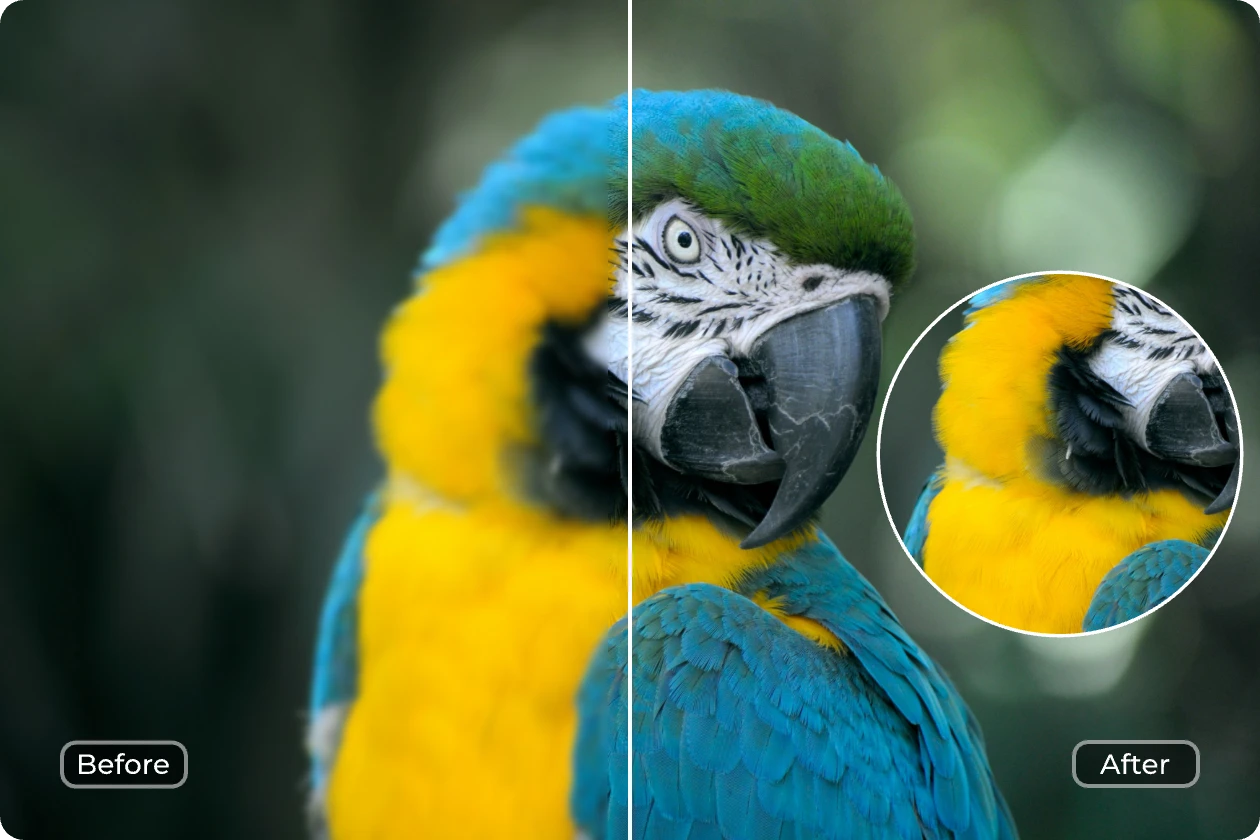
Explores how artificial intelligence shapes photography and enhancing images, covering practical use cases, benefits, limitations, and risks.
#Infobox
Artificial intelligence transforms photography by automating and enhancing image quality through computational techniques.
AI and Photography: Enhancing Images Field Artificial intelligence, Digital photography Key Techniques Super-resolution, noise reduction, color correction, upscaling, object recognition Applications Portrait enhancement, landscape restoration, medical imaging, surveillance, social media Notable Tools Adobe Photoshop, Topaz Gigapixel AI, DxO PureRAW, AI Ease, Luminar Neo First Developed Early 2000s (conceptual), 2010s (practical implementation) Influential Figures Fei-Fei Li, Andrew Ng, Ian Goodfellow, Jia Deng
#Overview
AI and photography represent a convergence of computational intelligence and visual artistry, enabling the automatic enhancement, restoration, and transformation of photographic images. This field leverages machine learning, neural networks, and computer vision to address challenges such as low resolution, noise, poor lighting, and color inaccuracies. AI-powered tools analyze image data, identify patterns, and apply corrections or improvements that were traditionally manual or impossible without advanced software.
The integration of AI into photography has democratized high-quality image editing, allowing amateurs and professionals alike to achieve studio-grade results with minimal effort. From smartphone apps to professional software suites, AI-driven enhancements are now ubiquitous in both consumer and industrial applications.
#History / Background
#Early Developments
The conceptual foundation for AI in photography traces back to early computer vision research in the 1960s and 1970s. Projects like the Shakey the robot and early image processing algorithms laid the groundwork for automated visual analysis. However, practical applications were limited by computational power and algorithmic sophistication.
In the 1990s, digital photography began to replace film, creating a demand for software tools to manage and enhance digital images. Programs like Adobe Photoshop introduced basic AI-like features such as automatic color correction and red-eye removal, though these were rule-based rather than truly intelligent.
#Rise of Deep Learning
The breakthrough came in the 2010s with the advent of deep learning and convolutional neural networks (CNNs). Researchers demonstrated that neural networks could outperform traditional methods in tasks such as image classification, object detection, and super-resolution. The ImageNet competition in 2012, where a CNN achieved unprecedented accuracy, marked a turning point.
By 2015, companies began releasing AI-powered photo enhancement tools. Adobe Sensei, launched in 2016, integrated AI into Photoshop for tasks like content-aware fill and facial recognition. Startups like Topaz Labs and Skylum introduced specialized AI software for noise reduction and upscaling, catering to both professionals and enthusiasts.
#How It Works
#Core Technologies
AI-powered image enhancement relies on several key technologies:
- Convolutional Neural Networks (CNNs): Specialized neural networks designed to process grid-like data such as images. CNNs analyze pixel patterns to detect features like edges, textures, and objects.
- Generative Adversarial Networks (GANs): Used for tasks like image super-resolution and inpainting. GANs consist of two networks—a generator that creates images and a discriminator that evaluates their realism.
- Autoencoders: Neural networks that compress images into a latent space and then reconstruct them, often used for noise reduction and denoising.
- Transformer Models: Originally developed for natural language processing, transformers are now adapted for image tasks, enabling more efficient and accurate enhancements.
#Common Enhancement Techniques
AI enhances images through a variety of techniques:
- Super-Resolution: AI upscales low-resolution images to higher resolutions while preserving detail. Tools like Topaz Gigapixel AI use GANs to reconstruct missing pixels.
- Noise Reduction: AI identifies and removes visual noise caused by low light or high ISO settings. DxO PureRAW and Adobe Lightroom employ deep learning models trained on noise patterns.
- Color Correction: AI analyzes color balance and applies automatic adjustments to match natural tones. This includes white balance correction and saturation enhancement.
- Object Recognition and Removal: AI detects and removes unwanted objects or blemishes from images. Adobe Photoshop’s "Content-Aware Fill" and similar tools use segmentation models to identify and replace pixels.
- Face and Portrait Enhancement: AI detects facial features and applies enhancements such as skin smoothing, wrinkle reduction, and eye brightening. Apps like FaceApp and Luminar Neo specialize in portrait retouching.
- HDR and Tone Mapping: AI merges multiple exposures to create high dynamic range (HDR) images, optimizing contrast and detail in shadows and highlights.
#Important Facts
- Accuracy and Limitations: While AI can dramatically improve image quality, it is not infallible. Over-enhancement can lead to artifacts, unnatural textures, or loss of original detail. The quality of results depends heavily on the training data and model architecture.
- Training Data: AI models require vast datasets of high-quality images to learn effectively. Datasets like ImageNet, COCO, and proprietary collections are used to train enhancement algorithms.
- Real-Time Processing: Modern AI tools can process images in real time, enabling instant feedback for photographers and videographers. This is particularly useful in applications like live streaming and mobile photography.
- Ethical Considerations: AI image enhancement raises ethical questions, including the potential for deepfakes, misinformation, and the manipulation of visual evidence. Tools that alter facial features or body shapes can contribute to unrealistic beauty standards.
- Accessibility: AI has made high-end image enhancement accessible to non-professionals. Free and low-cost tools like AI Ease and online platforms have lowered the barrier to entry for quality image editing.
- Industry Impact: The photography industry has seen significant disruption, with AI tools reducing the need for manual retouching and enabling faster workflows. Stock photo agencies and social media platforms increasingly rely on AI for image optimization.
#Timeline
Year Event 1966 Shakey the robot demonstrates early computer vision capabilities. 1990 Adobe Photoshop 1.0 is released, introducing basic automated image adjustments. 2012 AlexNet wins ImageNet competition, proving the power of deep learning for image recognition. 2015 Google Photos launches with AI-powered automatic enhancements and search capabilities. 2016 Adobe Sensei integrates AI into Photoshop for content-aware fill and facial recognition. 2017 Topaz Labs releases Gigapixel AI, a tool for AI-based image upscaling. 2018 NVIDIA introduces AI-based super-resolution technology for real-time video enhancement. 2019 DxO releases PureRAW, leveraging AI for noise reduction and RAW file processing. 2020 Luminar AI debuts, focusing on AI-powered portrait and landscape enhancement. 2022 Stable Diffusion and DALL·E 2 popularize AI-generated images, influencing enhancement workflows. 2023 AI Ease launches a free AI photo enhancer, targeting accessibility for amateur photographers.
#Related Terms
#FAQ
What does AI And Photography: Enhancing Images cover?
Explores how artificial intelligence shapes photography and enhancing images, covering practical use cases, benefits, limitations, and risks.
Why is AI And Photography: Enhancing Images important?
It helps readers understand key concepts, compare practical use cases, and evaluate how Computer Vision decisions affect outcomes, risks, and implementation choices.
What should readers verify before applying this topic?
Readers should compare the benefits, limitations, data requirements, and related themes such as Photography, Enhancing, Image before using the ideas in real projects.
#References
- AI And Photography: Enhancing Images terminology and background research
- AI And Photography: Enhancing Images use cases, implementation examples, and limitations
- Computer Vision best practices, standards, and risk guidance
- Photography case studies, benchmarks, and current industry analysis


Comments
No comments yet. Start the discussion with a useful note.